
Working From Home & Neck Pain: Why Your Body Won’t Relax | Phoenix Body & Mind
Working from home sounded like it would be easier on the body.
No commute. Your own chair. Your own schedule. Maybe even the freedom to work in sweatpants.
But somewhere between answering emails from the kitchen table, spending hours on Zoom, checking your phone between meetings, and finishing “just one more thing” from the couch, your body may have started telling a very different story.
Your neck feels tight.
Your shoulders seem permanently attached to your ears.
Your lower back aches when you stand up.
You stretch, roll your shoulders, maybe get a massage—and it feels better.
Then the tension comes right back.
If that sounds familiar, the problem may not simply be “tight muscles.”
Your body may be adapting to what you ask it to do all day.
Your Body Gets Really Good at What You Repeatedly Ask It to Do
The human body is designed to move.
Yet many workdays require us to remain in relatively similar positions for hours at a time.
When you're focused on a computer, your head may gradually move forward. Your shoulders may round. You may reach repeatedly for your mouse with the same arm or sit with your legs crossed without even realizing it.
And laptops create their own challenge.
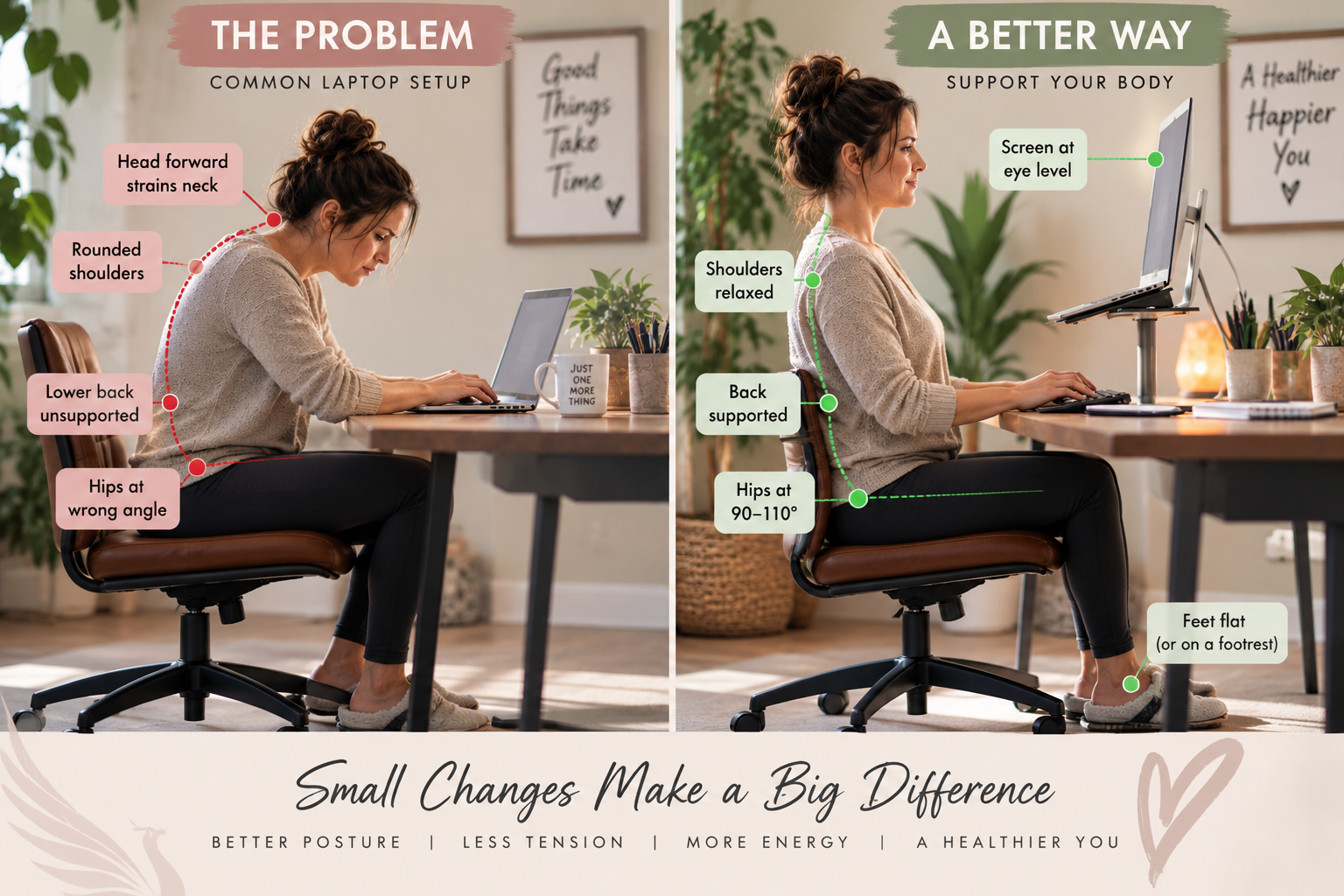
The screen and keyboard are attached. If the keyboard is positioned comfortably for your hands, the screen may be too low for your eyes. Raise the laptop for a better screen position, and now the keyboard may be too high.
UC Davis' Ergonomics Program discusses this exact problem. Because a laptop's keyboard and monitor are connected, prolonged laptop use can encourage users to compensate with their arms, neck or back.
Read UC Davis' Laptop Ergonomics recommendations
There Isn't One “Perfect” Posture
You've probably heard:
“Sit up straight.”
But posture isn't quite that simple.
According to the Occupational Safety and Health Administration (OSHA), there isn't one correct workstation position that fits everyone. Instead, your workstation should support comfortable, neutral positions while allowing you to change positions throughout the day.
See OSHA's Computer Workstation Guidelines
A generally neutral computer position includes:
Your head balanced rather than constantly angled forward or backward
Relaxed shoulders
Elbows relatively close to your body
Wrists in a comfortable, neutral position
Your back supported
Feet supported by the floor or a footrest
But here's the part people sometimes miss:
Even a great position isn't meant to be held forever.
OSHA specifically recommends changing your working position frequently, including standing and walking periodically.
Sometimes the best posture is simply your next posture.
Why Your Neck and Shoulders May Be Taking the Biggest Hit
Think about what happens when you're concentrating.
Your eyes lock onto the screen.
Your head begins creeping forward.
Your hand stays on the mouse.
Your shoulders gradually tense.
And you may stay there much longer than you realize.
OSHA notes that maintaining a static posture while viewing a monitor for a prolonged period can fatigue the muscles of the neck and shoulders. Repetitive computer tasks can also repeatedly load relatively small groups of muscles and tendons without enough recovery time.
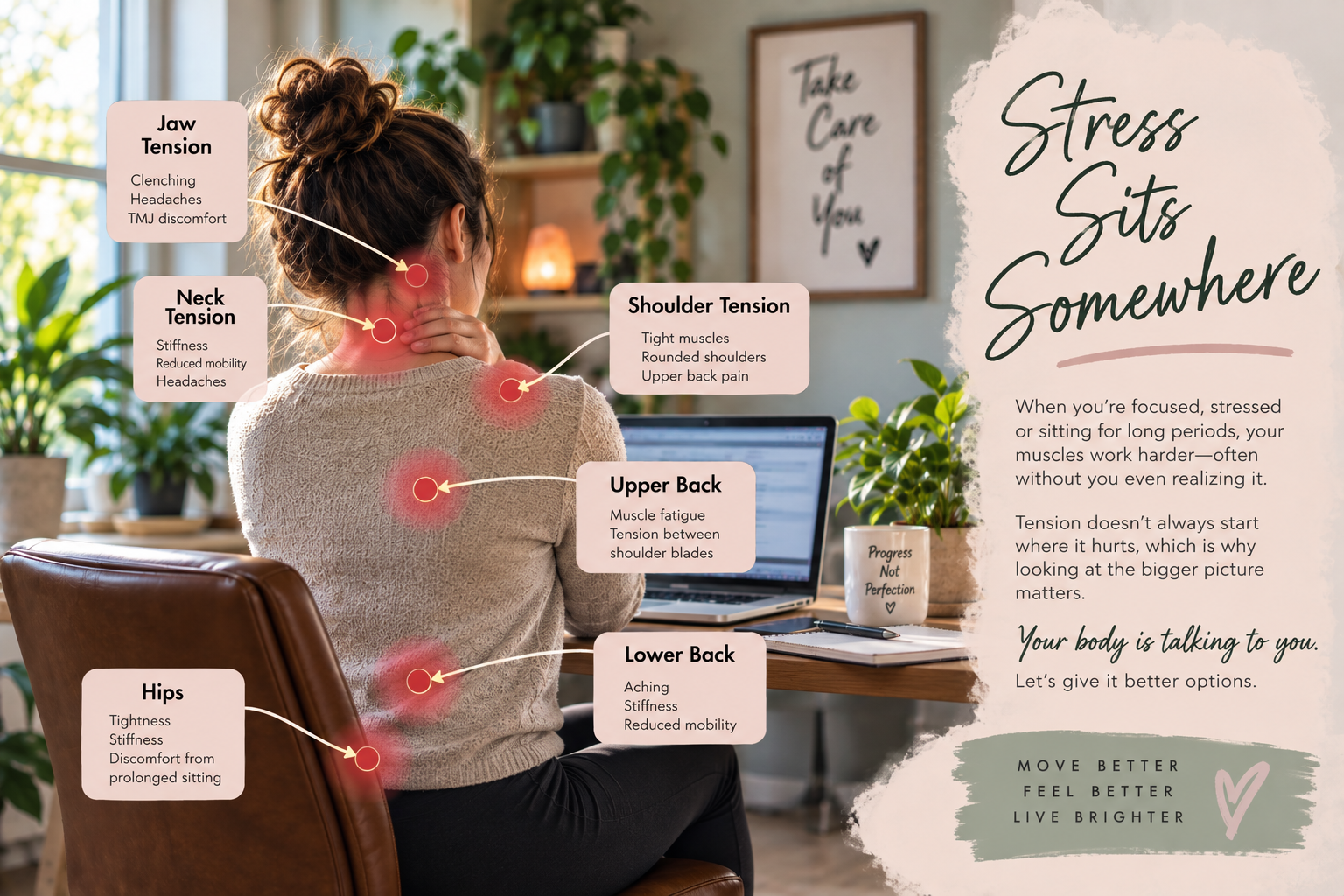
That's one reason people who spend their days at a computer commonly complain about tension through the:
Neck → Shoulders → Upper Back → Shoulder Blades
But here's where things become interesting.
Where you hurt isn't necessarily where the entire problem begins.
The painful muscle may be working overtime because of the demands being placed on it.
That's why simply working harder on the spot that hurts doesn't always produce lasting change.
What About Your Lower Back and Hips?
Your upper body isn't the only area affected by a long workday.
Hours spent sitting can mean less movement through your hips, pelvis and spine. Add a chair that doesn't support you well, sitting on one leg, leaning toward one side, or working from the couch, and you're giving your body very little variety.
Mayo Clinic recommends adjusting chair height so your feet are supported, supporting the spine, keeping frequently used equipment within comfortable reach, and positioning your monitor appropriately. For regular laptop use, they also suggest considering a laptop stand with an external keyboard and mouse.
Read Mayo Clinic's Office Ergonomics Guide
That doesn't mean sitting automatically causes your back pain.
It means your total movement pattern matters.
Eight hours of limited movement followed by another few hours on the couch doesn't give your body much opportunity to change positions and use different muscle groups.
And Then There's Stress
Here's the piece people often overlook.
You aren't just bringing your body to work.
You're bringing your nervous system too.
Deadlines.
Emails.
Clients.
Meetings.
Finances.
Children.
Running a business.
And when you work from home, there may not even be a clear line between work and home anymore.
You don't leave the office.
The office is sitting on your kitchen counter.
When you're stressed or intensely focused, pay attention to your body.
Are you clenching your jaw?
Are your shoulders creeping toward your ears?
Are you holding your breath?
Are you bracing your stomach?
So when someone says:
“I don't understand why I'm so tight. I haven't done anything.”
One of the questions we should be asking is:
What has your body been doing all day?
Because sitting at a computer doesn't mean your muscles aren't working.
“But I Stretch Every Day. Why Am I Still Tight?”
Stretching can feel wonderful.
And movement throughout the workday is something we absolutely encourage.
But if you stretch for five minutes and then return to the same position for another four hours, you haven't necessarily changed the pattern that's repeatedly loading the area.
Think about it this way:
If your smoke detector keeps going off, taking the battery out makes the noise stop.
But it doesn't tell you why there was smoke.
Recurring tension can be similar.
The goal shouldn't always be:
“How do we make this muscle loosen up?”
Sometimes the better question is:
“Why does this muscle keep feeling like it needs to tighten?”
That distinction is at the heart of how we approach corrective work at Phoenix Body & Mind.
5 Things You Can Change Today
You don't necessarily need a $3,000 ergonomic desk setup to start helping your body.
1. Get Your Screen Up
If you're constantly looking down at a laptop, consider elevating it and using an external keyboard and mouse.
Your goal is to make it easier to keep your head and neck in a comfortable position rather than spending hours looking downward.
2. Bring Your Mouse Closer
Pay attention to your mouse arm.
Are you constantly reaching forward or out to the side?
Moving frequently used items closer can reduce unnecessary reaching and help keep your arm closer to your body.
3. Support Your Feet
If your feet don't comfortably reach the floor, use a footrest or another stable support.
Your workstation should fit you rather than forcing your body to fit your workstation.
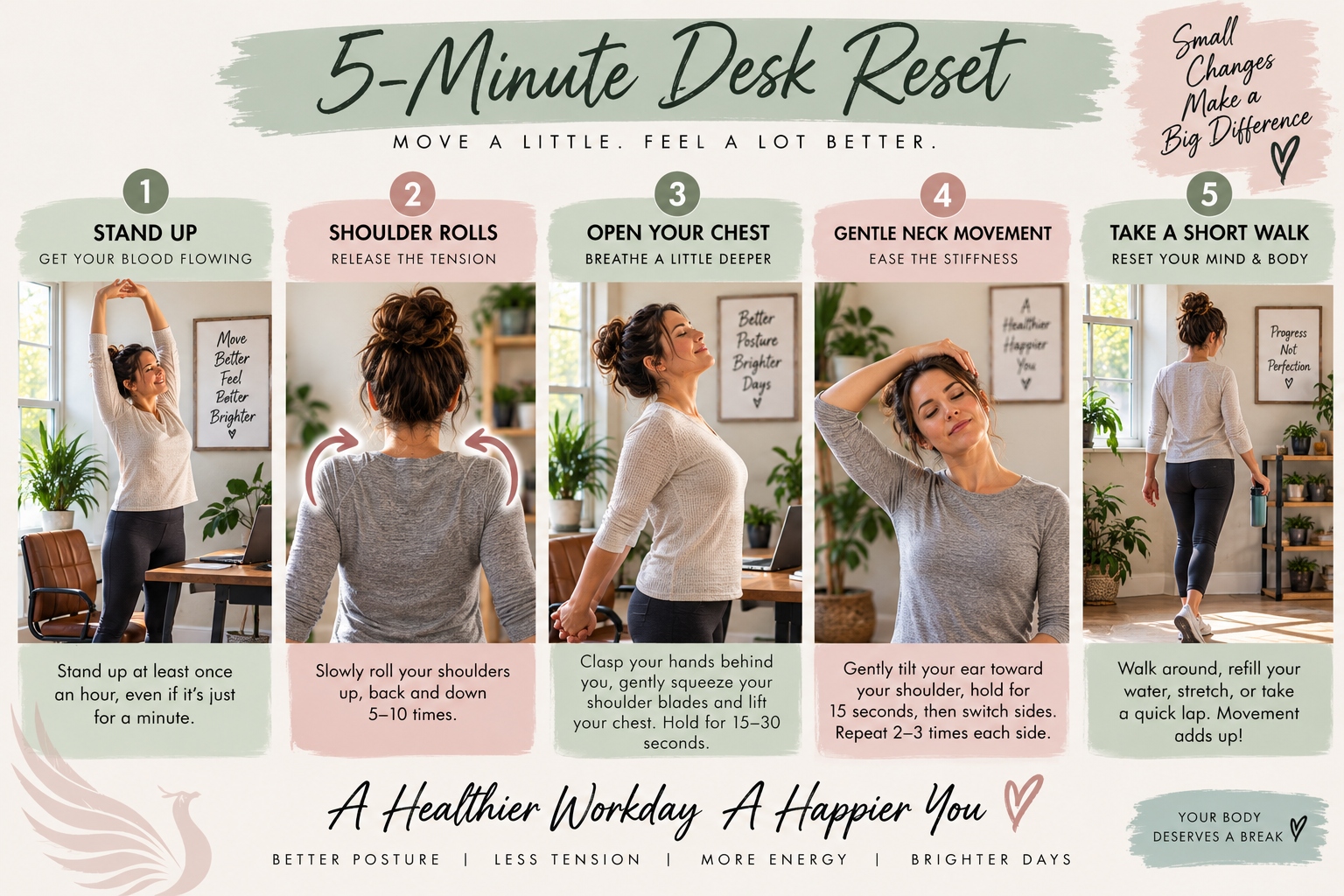
4. Move Before You Hurt
Don't wait until your neck is screaming at you.
Stand.
Walk around.
Roll your shoulders.
Change positions.
Take a phone call standing up.
OSHA recommends short recovery pauses during prolonged computer work and encourages people to stand, stretch and move around.
Movement doesn't have to be complicated to count.
5. Pay Attention to Patterns
Where do you repeatedly feel tension?
Does it happen around the same time every day?
Does one shoulder always bother you?
Does your lower back hurt after sitting but feel better when you move?
Those patterns are information.
Your body is talking to you.
Why Does Massage Help—But Then the Pain Comes Back?
This is where the difference between temporary relief and corrective work becomes important.
If a muscle is tight because it's responding to a larger pattern, relaxing that muscle may feel fantastic.
But if nothing changes about what's repeatedly asking that area to work so hard?
Your body may recreate the tension.
At Phoenix Body & Mind, we're not interested only in asking:
“Where does it hurt?”
We also want to know:
“Why does it keep hurting?”
That can mean looking beyond the painful area at movement, repetitive habits, muscular compensation and the demands you're placing on your body every day.
Because sometimes the place screaming the loudest isn't the place that started the problem.
Your Body Is Giving You Information
That aching shoulder at 3 p.m.
The headache that starts after a day on the computer.
The lower back that complains every time you stand up from your desk.
The neck that feels like it needs to be stretched every twenty minutes.
Those aren't things you should automatically ignore simply because you've become accustomed to them.
Your body adapts.
Your body compensates.
And eventually, your body lets you know when something isn't working well.
The goal isn't perfect posture.
The goal isn't never sitting.
And it certainly isn't quitting your job.
The goal is understanding the pattern and giving your body better options.
When It's Time to Get Some Help
If your neck, shoulder or back discomfort keeps returning despite stretching, changing your workspace or getting occasional massage, it may be worth looking more closely at what's happening.
That's exactly what we do at Phoenix Body & Mind in DeLand, Florida.
Our corrective approach looks beyond the place that hurts to help identify the patterns that may be contributing to recurring tension and discomfort.
Because sometimes your body doesn't need you to fight it.
It needs you to listen to it.
The body doesn't lie, but we can teach it a new truth.
Research & Resources
Occupational Safety and Health Administration (OSHA)
Computer Workstations eTool
OSHA
Work Process & Computer Ergonomics
Mayo Clinic
Office Ergonomics: Your How-To Guide
UC Davis Ergonomics Program
Laptop Ergonomics
